Adding Dynamics with Tempo
Why Dynamics Matter
Playing the same chord at the same volume over and over can start to sound flat. That’s where dynamics come in — varying how hard you strum on different beats gives your playing a sense of groove and life.
What Is an Accent?
An accent is when you intentionally hit a beat harder than the others. In typical 4/4 time, beat 1 is the strongest, with beat 3 coming in second. You don’t have to think too hard about it at first — just try strumming a little harder on beat 1, and you’ll feel the difference right away.
Use B.Click’s Tone Pattern Settings
It can be tricky to hear whether your own playing has dynamics. B.Click’s tone pattern settings let you build the accents right into the click itself, giving your ears a clear guide to follow.
In the beat settings screen you can configure the tone (dynamics) per beat, as well as the number of beats and the count-in before playback starts. There are three tone options for each beat:
- H (High): The accented beat — this is your cue to strum a little harder
- L (Low): A regular beat — strum at normal strength
- — (Silent): No click on this beat
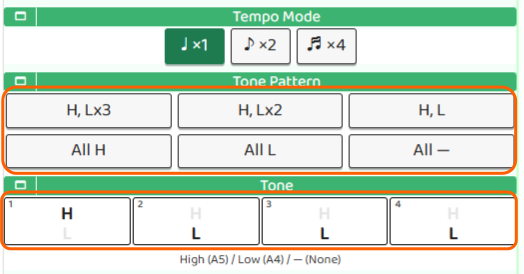
TonePattern lets you apply a preset in one go — options include “H, L×3”, “H, L×2”, and “H, L”. For 4/4 time, “H, L×3” sets beat 1 as high and beats 2–4 as low, making the accent easy to hear.
Tone lets you set each beat’s tone individually for a fully custom pattern.
When you’re done, tap “Done” to save your settings and return to the top screen.
Try It Out
Set the tone pattern to “H, L×3”, start the click, and strum your chord along with it. Play a little stronger on the H beat and a little softer on the L beats. Keep it going, and you’ll start to feel the natural pulse of the music.