Playing Melodies with Tab Notation
Melodies Are Usually Played One Note at a Time
Chords are played by sounding multiple strings at once, but melodies are usually based on single-note playing, where you play one note after another. Start at a slow tempo and focus on making each note sound carefully and cleanly.
B.Click’s Tab Mode
B.Click lets you switch the display mode on the performance screen. When you switch to Tab Mode, fret numbers appear in each measure, so you can play while reading tab notation.
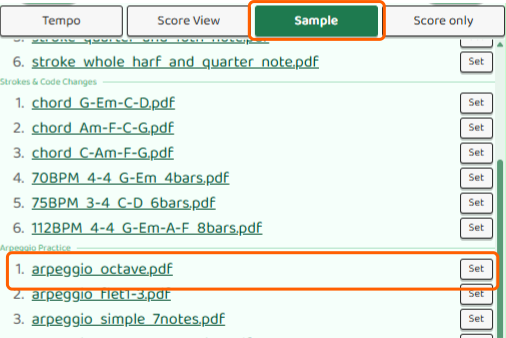
To try Tab Mode, start by opening a single-note melody sample score such as arpeggio_octave.pdf from Sample on the performance screen.
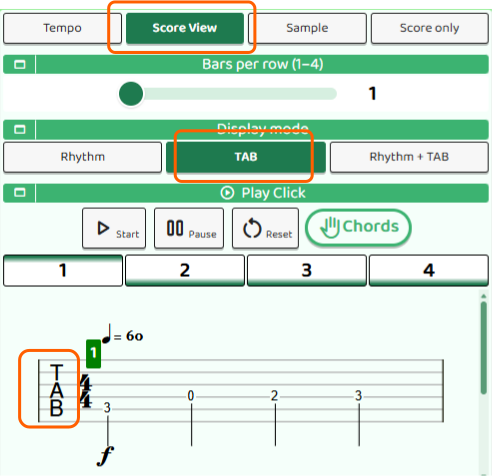
After opening the score, press the ScoreView button and choose TAB. The display changes to focus on the string and fret number you should press. This mode is useful when you already understand the rhythm and want to focus on where to press and how to move your fingers.
Rhythm + Tab Mode
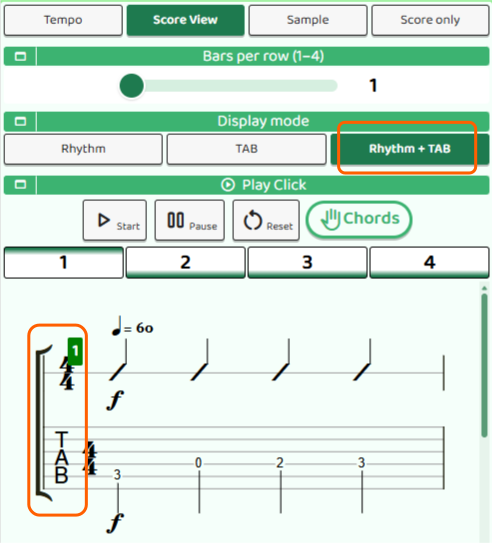
In Rhythm + Tab Mode, you can display both slash notation for the rhythm and the tab fret numbers at the same time. This is useful when you want to practice while checking the rhythm and pitch together.
Choose Rhythm+TAB from the ScoreView button to view the rhythm notation and tab notation together. If you are not yet confident with the rhythm, this display is often easier to play from.
How to Read Tab Notation
Tab notation is often used for guitar melodies. Instead of standard staff notation, tab shows which string and which fret to press on the guitar. Numbers are written in place of note symbols.
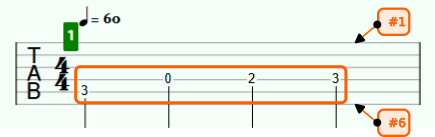
- Horizontal lines: These represent the guitar strings. From top to bottom, they are strings 1 through 6.
- Numbers: These are the fret numbers to press. “0” means an open string, where you do not press any fret.
For example, if you press the 3rd fret of the 2nd string, the number “3” is written on the second horizontal line. Read the score from left to right, not from top to bottom.
Start with a Slow Tempo
When playing while reading tab notation, start by lowering the tempo quite a lot. Check “which fret comes next” and play one note at a time so your finger movement and the sound start to connect. Once you get used to it, gradually raise the tempo.