Playing Along with a Score
Why Playing with a Score Helps
So far you’ve practiced pressing a chord and playing in time with the click. The next step is playing along a chord progression — a sequence of chords that flows like a song. A chord progression simply means which chords you play and in what order. For example, G → C → G → D means you play each chord for one measure, cycling through the sequence.
Reading a score as you play lets you see not just the current chord, but the next chord coming up. Knowing what’s ahead is key to making smooth chord changes.
Loading a Sample Score
B.Click comes with built-in sample scores so you can start practicing right away without creating your own.
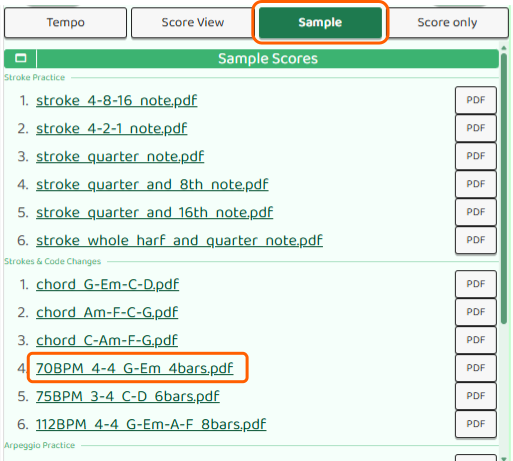
- Tap the Play button at the bottom of the main screen
- Tap the Sample button on the next screen to see the list of sample scores
- Tap Try next to the score you want to use
- Tap Score only to open the score screen
Playing Along with the Click
In the score screen, the chord progression is shown measure by measure. Press the ▷Start button to begin the click — every 4 beats, the current measure advances and is highlighted on the score.
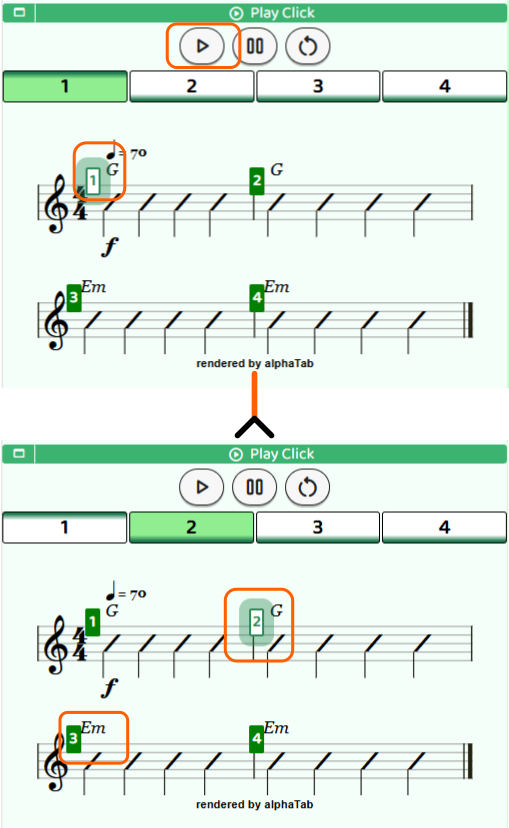
Strum the chord shown in the highlighted measure, keeping in time with the click. Tracking both the tempo and the chord progression at the same time trains your rhythm and chord feel together.
Start with a slow tempo until you feel comfortable reading the score while playing.
If You’re Having Trouble
If you lose track of how to play a chord, tap the “Chord” button on the score screen. You’ll see a list of chord diagrams for all the chords in the progression.
If the tempo is too fast to keep up, tap the “Tempo” button to bring up the tempo dial and slow it down. Once you feel comfortable reading the score while playing, gradually bring the tempo back up.