Learn Scales and Play Melodies Freely
From Tab Notation to Scale Practice
When you play single-note melodies or arpeggios while reading tab notation, have you ever wondered, “Why do these notes flow so naturally together?”
There is actually a pattern behind those connections — and that pattern is called a scale. Scale practice is a way to learn those note arrangements as a complete shape on the fretboard.
When you learn scales, they are not only for practice. They also let you explore sounds and play freely with melodies. For example, they can lead to these kinds of enjoyment:
- It becomes easier to try short melodies that are not written in a score.
- They give you an entry point for creating solo-like phrases.
- They become a foundation for enjoying improvised playing.
A scale is a sequence of notes chosen according to a certain rule. Once you memorize where the notes of a scale are on the fretboard, you can start building melodic phrases naturally without looking at a score.
Scale practice also trains your fingers to play each note at the correct position independently. If you continue it alongside chord practice, your overall finger movement will gradually become smoother.
Eventually, aim to memorize the scale positions and play them confidently.
Choose from Two Scale Types
B.Click’s scale diagram screen can display two types of scales.
- Pentatonic scale (5 notes): Made up of the five notes C D E G A. This scale is often used in rock and blues. Its notes tend to blend well no matter which one you play, so it is also recommended for beginners who want to try improvising.
- Diatonic scale (7 notes): Made up of the seven notes C D E F G A B. This is a basic scale used in classical music and pop, and it makes it easier to create richer melody lines.
Start with the pentatonic scale first, then try the diatonic scale once you get used to it.
Narrow the Fret Range to Make It Easier to Learn
The fret range slider lets you narrow the fret range used for practice. Starting with a small range such as 0F to 4F makes it easier to memorize note positions. By gradually expanding the range, you can naturally learn the notes across the whole fretboard.
Auto-switch Notes with Practice Mode
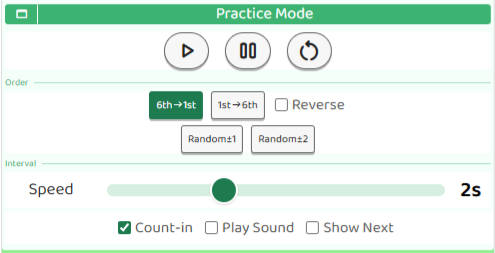
In the Practice area, scale notes are displayed one by one automatically. You can choose from four order modes.
- Low→High: Moves in order from the low notes on the 6th string to the high notes on the 1st string.
- High→Low: Moves in the reverse order, from high notes to low notes.
- Random ±1: Moves randomly between neighboring notes. Useful for training small movements.
- Random ±2: Moves randomly to notes one or two steps away. Useful for practicing slightly larger jumps.
Turning Reverse on makes the sequence turn around when it reaches the end, creating back-and-forth practice (available only in Low→High and High→Low modes).
Useful Options
- Show next note: The next note to play is highlighted in orange. You can check where your finger should move before playing it.
- Play sound: A guitar sound plays when each note switches. You can check the position while listening to the sound.
- Count-in: A countdown sound plays before practice starts.
The interval slider and checkbox settings can also be changed while practice is playing. This is useful because you can adjust them as you practice.
Even with a wide fret range, if the note being practiced moves off the screen, the view scrolls automatically to show it.
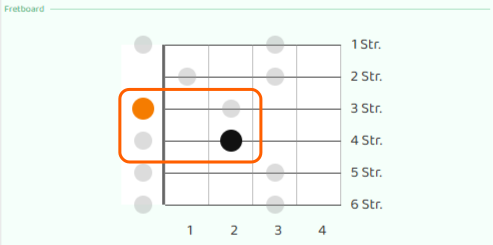
Turning Count-in on gives you time to get ready before starting, which makes practice feel easier.

Start with a slow interval (around 3 to 4 seconds) and check each fret position one by one as you practice. Once your fingers start moving more easily, shorten the interval and raise the tempo.
Note: This app displays scales based on C major. C major pentatonic uses the same notes as A minor pentatonic, and C major diatonic uses the same notes as A natural minor diatonic.