Learn Chords by Practicing Chord Changes Repeatedly
Repetition Is the Best Way to Learn Chords with Your Body
The fastest path to smooth chord changes is to practice repeatedly until your fingers move naturally. Once your fingers can move without having to think “press here,” you can focus your attention on strumming and rhythm.
Eventually, aim to play chords without looking at the diagram.
Auto-switch Chords with Practice Mode
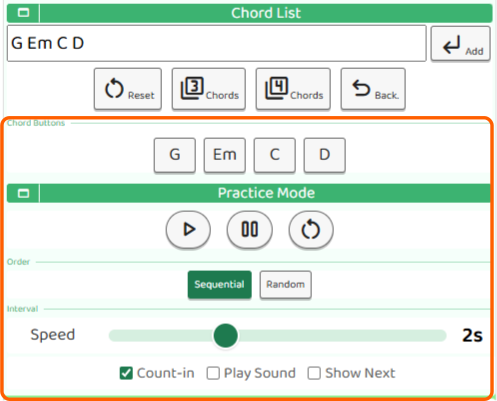
The chord diagram screen in B.Click has a Practice Mode. Add the chords you want to practice to the list, and the chord switches automatically at the interval you set. It is ideal for repeatedly practicing chord shapes while looking at the chord diagram.
Adjust the Order and Speed
There are two order modes: Sequential and Random. Sequential switches through the registered chords in order, while Random switches them in an irregular order. Start with Sequential to memorize the flow, then switch to Random once you get used to it so you can train sudden chord changes.
The switching interval can be set in seconds with the slider. Start with a comfortable, longer interval (around 3 to 4 seconds), then gradually shorten it as your fingers start moving more easily.
Useful Options
- Count-in: A countdown sound plays before practice starts. The number of beats is shared with the Beat settings.
- Play sound: A strum sound plays each time the chord changes. You can practice while checking with both your eyes and ears.
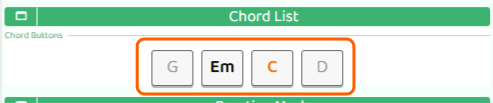
- Show next chord: The next chord is highlighted in orange. This makes it easier to develop the habit of preparing your fingers early.
Turning Count-in on gives you time to get ready before starting, which makes practice feel easier.

Start with a slow interval (around 3 to 4 seconds) and check each chord position one by one as you practice. Once you can play without looking at the diagram, shorten the interval and raise the tempo.