 .Click
チューニングしよう How to Tune Your Guitar Cómo afinar tu guitarra
チューニングって何?
チューニングとは、ギターの各弦の音程を正しく合わせることです。ギターは温度や湿度の変化、弾いているうちに弦が伸びるなどの理由で、少しずつ音がズレていきます。
音がズレたまま練習を続けると、正しい音感が身につきにくくなってしまいます。また、誰かと一緒に演奏するときや録音して聴き直すときに、ほんの少しのズレがよく目立ちます。面倒に感じるかもしれませんが、練習前のチューニングは毎回の習慣にしましょう。
弦を鳴らす
チューニングのためには弦を1本鳴らす必要があります。ピックでも指でも鳴らすのはOKです。まだピックに慣れていない場合は、ひとまず指で弦を弾いてみましょう。
B.Click のチューナーを使う
B.Click にはマイクを使ったチューナー機能が内蔵されています。スマートフォンやパソコンのマイクをそのまま使えるので、別途チューナーを用意する必要はありません。
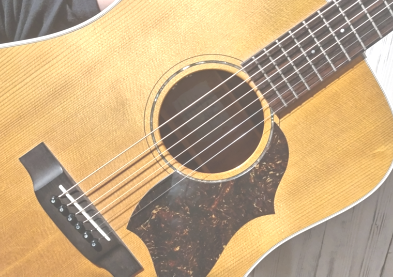
START ボタンを押してチューニングを開始します。ギターをマイクの近くで持ち、弦を1本鳴らしてください。マイク(スマホ)はサウンドホールの近くに置くとよいです。
標準チューニングの音
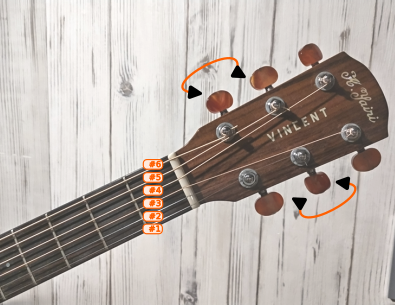
ギターの標準チューニング(レギュラーチューニング)では、6弦から順に次の音に合わせます。
| 弦 | 音名 |
|---|---|
| 6弦(最も太い) | E2(ミ) |
| 5弦 | A2(ラ) |
| 4弦 | D3(レ) |
| 3弦 | G3(ソ) |
| 2弦 | B3(シ) |
| 1弦(最も細い) | E4(ミ) |
チューナーに表示される音名と照らし合わせながら、1本ずつ丁寧に合わせていきましょう。
画面の見方
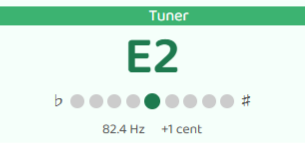
チューナーには、今鳴っている音の音名と、音程のズレが表示されます。
- 中央のドットが緑色:チューニングが合っています。OK です!
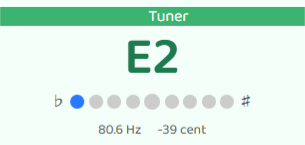
- 左寄り(青):音が低すぎます。ペグを回して音を上げましょう。
- 右寄り(赤):音が高すぎます。ペグを回して音を下げましょう。
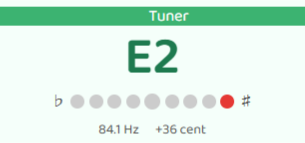
針が中央の緑に収まるように、ペグをゆっくり回して調整してください。全弦のチューニングが終わったら、STOP ボタンを押してチューナーを終了します。
チューニングのコツ
- 弦を弾いた直後が一番安定します。鳴らしてすぐ確認するのがポイントです。
- 低い音から合わせる方が安定しやすいです。音が低い場合は一度さらに下げてから上げると、ペグのガタつきが減ってズレにくくなります。
- 弦を張り替えたばかりのときは弦が伸びていないので、何度かチューニングし直す必要があります。6弦→1弦を2〜3周繰り返すと安定してきます。
チューニングが終わったら、さっそく練習を始めましょう。
見落としがちな点
1周だけで終わらせてしまう
6弦から1弦まで一通り合わせたところで終えてしまうのは、よくあるミスです。実は、ペグを回すたびに弦全体の張力がわずかに変わり、他の弦の音程にも少し影響することがあります。
6弦から1弦まで合わせたら、もう一度6弦から確認し直しましょう。2〜3周繰り返すと全弦が安定します。
What Is Tuning?
Tuning means adjusting each string of your guitar to the correct pitch. Guitars naturally go out of tune over time — temperature changes, humidity, and the simple act of playing all cause the strings to drift.
If you practice with an out-of-tune guitar, you'll have a harder time developing a good ear for pitch. The problem becomes especially noticeable when you play with other people or listen back to a recording — even small pitch differences stand out clearly. It might feel like a chore at first, but making tuning a habit before every practice session is well worth it.
Pluck a String
To tune, you need to pluck one string at a time. You can use a pick or your fingers — either works fine. If you're not yet comfortable holding a pick, just use your finger for now.
Using the B.Click Tuner
B.Click has a built-in tuner that uses your device's microphone — no separate tuner needed.
Press the START button to begin tuning. Hold your guitar near the mic and pluck one string at a time. Placing your microphone (smartphone) near the sound hole gives the best results.
Standard Tuning Notes
In standard tuning, the six strings are tuned to the following notes, from thickest to thinnest:
| String | Note |
|---|---|
| 6th (thickest) | E2 |
| 5th | A2 |
| 4th | D3 |
| 3rd | G3 |
| 2nd | B3 |
| 1st (thinnest) | E4 |
Check the note name shown on the tuner and adjust each string one by one.
Reading the Display
The tuner shows the name of the note it's detecting and how far off the pitch is.
- Center dot is green: You're in tune — nice!
- Left side (blue): The string is too low. Turn the tuning peg to raise the pitch.
- Right side (red): The string is too high. Turn the tuning peg to lower the pitch.
Slowly adjust the peg until the needle settles in the green center zone. When all strings are tuned, press the STOP button to close the tuner.
Tuning Tips
- Pluck the string and check right away — the pitch is most stable right after you play it.
- Tune up from below — if a string is flat, try going a little lower first and then tuning up. This reduces slack in the peg and keeps the tuning more stable.
- New strings go out of tune quickly — they need time to stretch. Go through all six strings two or three times per session until they settle down.
Once everything is in tune, let's start practicing!
Easy to Overlook
Stopping after just one pass
Many beginners tune each string from the 6th down to the 1st and then call it done. But each time you turn a tuning peg, the tension across all the strings shifts slightly — which means the strings you already tuned can drift a little out of place.
After going through all six strings once, go back to the 6th string and check again. Repeating this two or three times lets everything settle into tune together.
¿Qué es afinar?
Afinar significa ajustar cada cuerda de la guitarra a su tono correcto. Las guitarras se desafinan con el tiempo por los cambios de temperatura, la humedad y simplemente por tocar.
Si practicas con la guitarra desafinada, te costará más desarrollar el oído musical. El problema se nota especialmente cuando tocas con otras personas o cuando escuchas una grabación — incluso pequeñas diferencias de tono se aprecian con claridad. Al principio puede parecer tedioso, pero afinar antes de cada sesión de práctica es un hábito que vale mucho la pena.
Tocar una cuerda
Para afinar, necesitas tocar una cuerda a la vez. Puedes hacerlo con una púa o con los dedos — cualquiera funciona bien. Si todavía no te sientes cómodo sosteniendo una púa, usa el dedo por ahora.
Usar el afinador de B.Click
B.Click tiene un afinador integrado que usa el micrófono de tu dispositivo — no necesitas ningún afinador externo.
Pulsa el botón START para comenzar a afinar. Acerca la guitarra al micrófono y pulsa una cuerda a la vez. Colocar el micrófono (smartphone) cerca del boca de la guitarra da los mejores resultados.
Notas de la afinación estándar
En la afinación estándar, las seis cuerdas se afinan así, de la más gruesa a la más fina:
| Cuerda | Nota |
|---|---|
| 6ª (más gruesa) | Mi (E2) |
| 5ª | La (A2) |
| 4ª | Re (D3) |
| 3ª | Sol (G3) |
| 2ª | Si (B3) |
| 1ª (más fina) | Mi (E4) |
Compara la nota que muestra el afinador y ajusta cuerda por cuerda.
Leer la pantalla
El afinador muestra el nombre de la nota que detecta y cuánto se aleja del tono correcto.
- Punto central en verde: ¡Estás afinado!
- Lado izquierdo (azul): La cuerda está muy baja. Gira la clavija para subir el tono.
- Lado derecho (rojo): La cuerda está muy alta. Gira la clavija para bajar el tono.
Ajusta la clavija lentamente hasta que la aguja se quede en el centro verde. Cuando todas las cuerdas estén afinadas, pulsa el botón STOP para cerrar el afinador.
Consejos para afinar
- Pulsa la cuerda y mira enseguida — el tono es más estable justo después de tocarla.
- Afina subiendo desde abajo — si la cuerda está baja, bájala un poco más y luego sube. Esto reduce el juego en la clavija y mantiene la afinación más estable.
- Las cuerdas nuevas se desafinan rápido — necesitan tiempo para estirarse. Recorre las seis cuerdas dos o tres veces por sesión hasta que se asienten.
Cuando todo esté afinado, ¡a practicar!
Algo que se suele pasar por alto
Parar después de una sola vuelta
Muchos principiantes afinan cada cuerda de la 6ª a la 1ª y dan el proceso por terminado. Sin embargo, cada vez que giras una clavija la tensión de todas las cuerdas cambia ligeramente, lo que puede desafinar un poco las cuerdas que ya habías ajustado.
Cuando hayas pasado por las seis cuerdas, vuelve a la 6ª y comprueba de nuevo. Repetir este proceso dos o tres veces permite que todas las cuerdas se estabilicen juntas.