 .Click
テンポに合わせてストロークしよう Strum in Time with the Beat Rasguea al ritmo del click
テンポを意識して弾くことが大事
コードが押さえられるようになったら、次は一定のリズムで弾く練習です。どんなに正確にコードを押さえられても、リズムがバラバラだと音楽として聴こえません。
最初はゆっくりなテンポから始めて、慣れてきたら少しずつ速くしていきましょう。
B.Clickのクリックを使おう
B.Clickにはメトロノームのようなクリック機能があります。クリックに合わせて弾くことで、一定のテンポをキープする感覚が身につきます。
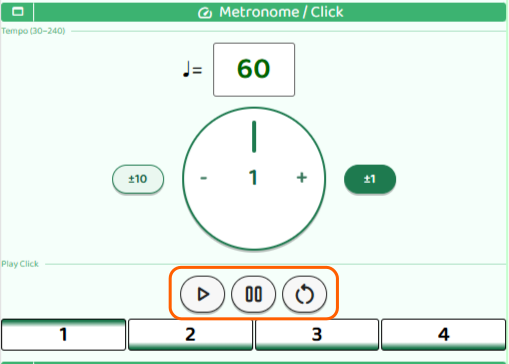
- Startボタン:クリックを開始します
- Pauseボタン:一時停止します
- Resetボタン:テンポをリセットします
Startを押すと、まずカウントインが流れてからクリックが始まります。
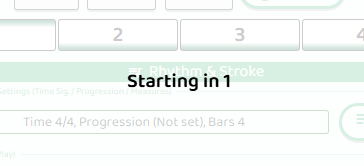
カウントインが終わったら、クリックに合わせて弾き始めましょう。
ダウンストロークで弾いてみよう
クリックが鳴ると、拍の番号が1・2・3・4と順番に変化します。この番号が変わるたびにダウンストロークで弾きます。
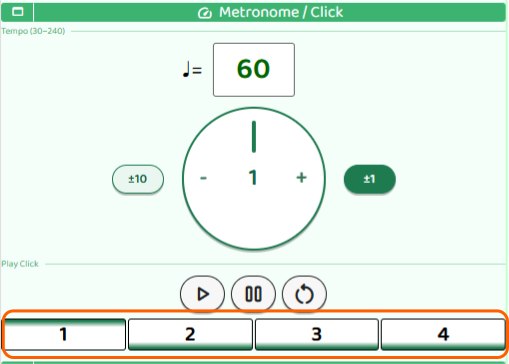
「カチッ」という音と番号の変化に合わせて、ピックを振り下ろすイメージです。画面を見ながら弾くと、タイミングが掴みやすくなります。
ダウン+アップストロークにチャレンジ
ダウンストロークに慣れてきたら、アップストローク(弦を下から上へ払う動き)も加えてみましょう。クリック1回に対してダウン→アップの2回弾く感覚です。
最初はテンポをゆっくりにして、ダウンとアップが均等なリズムになるよう意識してみてください。
Why Timing Matters
Once you can press a chord, the next step is playing it in steady time. Even if your chord shapes are perfect, uneven rhythm will keep it from sounding like music.
Start with a slow tempo and speed up gradually as you get comfortable.
Use the B.Click Click Feature
B.Click has a built-in click function that works like a metronome. Strumming along with the click helps you develop a consistent sense of tempo.
- Start: Begin the click
- Pause: Pause the click
- Reset: Reset the tempo
When you press Start, a count-in plays first before the click begins.
Once the count-in finishes, start strumming along with the click.
Try Downstrokes in Time
When the click sounds, the beat number advances — 1, 2, 3, 4. Strum a downstroke each time the number changes.
Match your strum to both the sound and the changing number on screen. Watching the display can make it easier to lock in your timing.
Add Upstrokes
Once your downstrokes feel steady, try adding an upstroke right after each downstroke — sweeping the pick back upward across the strings. You'll now be playing two strums per click: down then up.
Start slowly so that the down and up strokes stay evenly spaced.
Por qué importa el tiempo
Una vez que puedes formar un acorde, el siguiente paso es tocarlo a un tiempo constante. Aunque tus posiciones de acorde sean perfectas, el ritmo irregular hará que no suene como música.
Empieza con un tempo lento y auméntalo poco a poco a medida que te vayas sintiendo cómodo.
Usa la función de clic de B.Click
B.Click tiene una función de clic integrada que funciona como un metrónomo. Rasguear al ritmo del clic te ayuda a desarrollar un sentido estable del tempo.
- Start: Inicia el clic
- Pause: Pausa el clic
- Reset: Reinicia el tempo
Al pulsar Start, primero suena un conteo previo antes de que empiece el clic.
Cuando termine el conteo, empieza a rasguear al ritmo del clic.
Prueba los golpes hacia abajo al ritmo
Cuando suena el clic, el número del tiempo avanza: 1, 2, 3, 4. Rasguea hacia abajo cada vez que el número cambie.
Sincroniza tu rasgueo con el sonido y el número que cambia en pantalla. Mirar la pantalla puede ayudarte a encontrar el timing con más facilidad.
Agrega los golpes hacia arriba
Cuando los golpes hacia abajo te salgan seguros, prueba a añadir un golpe hacia arriba justo después de cada golpe hacia abajo — moviendo la púa de abajo hacia arriba sobre las cuerdas. Ahora estarás tocando dos rasgueos por clic: abajo y arriba.
Empieza despacio para que los golpes hacia abajo y hacia arriba queden espaciados de manera uniforme.