 .Click
アクセントで表情をつけよう Add Accents to Your Playing Dale expresión con acentos
強弱をつけると演奏が変わる
同じコードを同じテンポで弾き続けていると、どうしても単調に聞こえてしまいます。そこで大事になるのが「強弱」です。一定のリズムの中で、ある拍を強く、ある拍を弱く弾くことで、演奏に生き生きとした表情が生まれます。
アクセントとは
強弱の中でも、特定の拍を意識的に強く弾くことをアクセントといいます。一般的な4拍子の曲では1拍目(ダウンビート)が最も強く、3拍目がその次に強い、という流れが基本です。
最初はシンプルに「1拍目だけ少し強めにストロークする」を意識するだけでも、演奏のノリがぐっと変わります。
B.Clickの音色パターンで確認しよう
自分の演奏に強弱がついているかどうかは、耳で確認するのが難しいこともあります。B.Clickの音色パターン設定を使うと、クリック音自体に強弱のヒントを持たせることができます。
「拍」設定画面では、拍ごとの音色(強弱)のほか、拍の数や演奏前のカウントイン数も設定できます。設定できる音色は3種類です。
- H(高音):アクセントのある拍。強く弾くタイミングの目安にします
- L(低音):通常の拍。普通の強さで弾きます
- —(無音):クリック音を鳴らさない拍
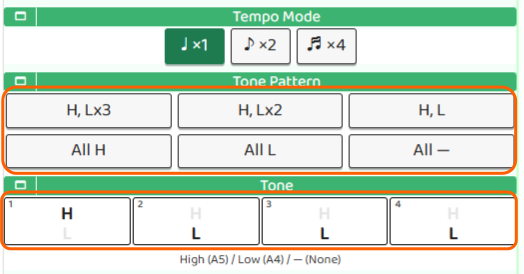
TonePatternでは「H, L×3」「H, L×2」「H, L」などのプリセットから一括で設定できます。たとえば4拍子なら「H, L×3」を選ぶと、1拍目だけ高音・残り3拍が低音になり、アクセントの位置が耳で分かりやすくなります。
Toneでは各拍の音色を1つずつ個別に設定することもできます。自分の練習したいリズムパターンに合わせてカスタマイズしてみましょう。
設定が終わったら 「Done」 を押すと、設定を保存してトップ画面に戻ります。
まずは4拍子で試してみよう
「H, L×3」に設定して、クリックを流しながらコードをストロークしてみてください。Hの音に合わせて少し強めに弾き、Lの音では少し弱めに弾く、これを繰り返すうちに自然と強弱が身についてきます。
Why Dynamics Matter
Playing the same chord at the same volume over and over can start to sound flat. That's where dynamics come in — varying how hard you strum on different beats gives your playing a sense of groove and life.
What Is an Accent?
An accent is when you intentionally hit a beat harder than the others. In typical 4/4 time, beat 1 is the strongest, with beat 3 coming in second. You don't have to think too hard about it at first — just try strumming a little harder on beat 1, and you'll feel the difference right away.
Use B.Click's Tone Pattern Settings
It can be tricky to hear whether your own playing has dynamics. B.Click's tone pattern settings let you build the accents right into the click itself, giving your ears a clear guide to follow.
In the beat settings screen you can configure the tone (dynamics) per beat, as well as the number of beats and the count-in before playback starts. There are three tone options for each beat:
- H (High): The accented beat — this is your cue to strum a little harder
- L (Low): A regular beat — strum at normal strength
- — (Silent): No click on this beat
TonePattern lets you apply a preset in one go — options include "H, L×3", "H, L×2", and "H, L". For 4/4 time, "H, L×3" sets beat 1 as high and beats 2–4 as low, making the accent easy to hear.
Tone lets you set each beat's tone individually for a fully custom pattern.
When you're done, tap "Done" to save your settings and return to the top screen.
Try It Out
Set the tone pattern to "H, L×3", start the click, and strum your chord along with it. Play a little stronger on the H beat and a little softer on the L beats. Keep it going, and you'll start to feel the natural pulse of the music.
Por qué importa la dinámica
Rasguear el mismo acorde siempre con la misma intensidad puede sonar monótono. Ahí es donde entra la dinámica: variar la fuerza con la que tocas en distintos tiempos le da a tu interpretación groove y expresión.
¿Qué es un acento?
Un acento es cuando golpeas un tiempo con más fuerza que los demás. En el compás de 4/4, el tiempo 1 es el más fuerte, seguido del tiempo 3. No tienes que pensarlo demasiado al principio — simplemente intenta rasguear un poco más fuerte en el primer tiempo y notarás la diferencia de inmediato.
Usa la configuración de patrones de tonos de B.Click
A veces es difícil escuchar si tu propia forma de tocar tiene dinámica. La configuración de patrones de tonos de B.Click te permite incorporar los acentos directamente en el click, dándole a tus oídos una guía clara.
En la pantalla de configuración de tiempos puedes ajustar el tono (dinámica) por tiempo, así como el número de tiempos y el conteo previo antes de que empiece la reproducción. Hay tres opciones de tono para cada tiempo:
- H (agudo): El tiempo acentuado — tu señal para rasguear con un poco más de fuerza
- L (grave): Un tiempo normal — rasguea con intensidad regular
- — (silencio): No suena el click en este tiempo
TonePattern permite aplicar un preset de una sola vez — las opciones incluyen "H, L×3", "H, L×2" y "H, L". Para el compás de 4/4, "H, L×3" pone el tiempo 1 en agudo y los tiempos 2–4 en grave, lo que hace muy fácil escuchar dónde cae el acento.
Tone permite configurar el tono de cada tiempo de forma individual para crear un patrón totalmente personalizado.
Cuando termines, pulsa "Done" para guardar la configuración y volver a la pantalla principal.
Pruébalo ahora
Configura el patrón de tonos en "H, L×3", activa el click y rasguea tu acorde siguiendo el ritmo. Toca un poco más fuerte en el tiempo H y un poco más suave en los tiempos L. Sigue practicando y poco a poco sentirás el pulso natural de la música.