 .Click
TAB譜でメロディを弾いてみよう Play Melodies with Tab Notation Toca melodías con tablatura
メロディは単音弾きが基本
コード(和音)は複数の弦を一度に鳴らす奏法ですが、メロディは1音ずつ順番に鳴らす単音弾きが基本です。ゆっくりなテンポで1音1音を丁寧に鳴らすことを意識してみましょう。
B.Click の TAB 譜モード
B.Click には演奏画面の表示モードを切り替える機能があります。TAB譜モードに切り替えると、各小節にフレット番号が表示され、TAB譜を見ながら演奏できます。
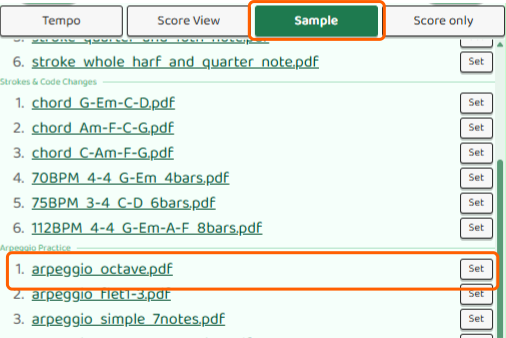
まずは演奏画面の Sample から、arpeggio_octave.pdf のような単音メロディのサンプル楽譜を開くと、TAB譜モードの表示を試しやすいです。
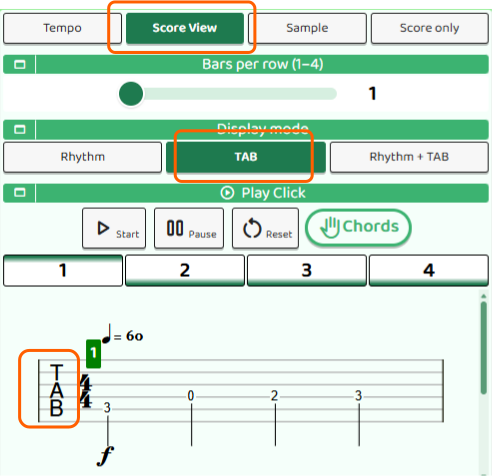
楽譜を開いたら ScoreView ボタンを押して、TAB を選びます。すると、押さえる弦とフレット番号が中心の表示に切り替わります。リズムはすでに把握できていて、どこを押さえて音を鳴らすか、指をどう運ぶかに集中したいときに向いています。
リズム+TAB譜モード
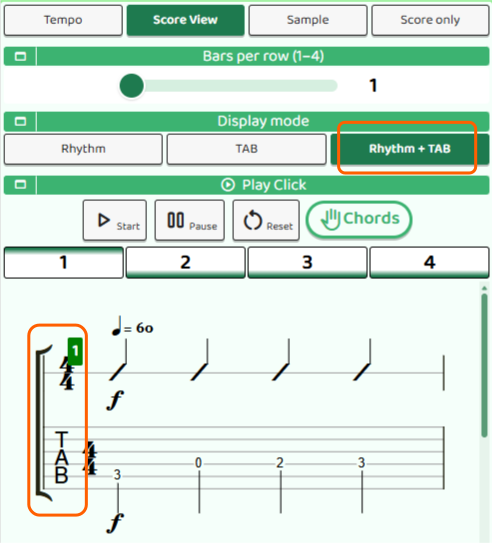
リズム+TAB譜モードでは、スラッシュ譜(リズムの目安)とTAB譜のフレット番号を同時に表示できます。リズムと音程を一緒に確認しながら練習したいときに便利です。
ScoreView ボタンから Rhythm+TAB を選ぶと、リズム譜とTAB譜をまとめて見られます。まだリズムに自信がない段階では、こちらの表示の方が弾きやすいことも多いです。
TAB譜の読み方
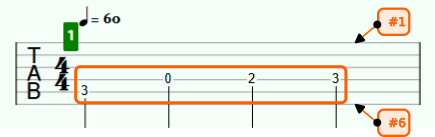
メロディの楽譜としてよく使われるのがTAB譜(タブ譜)です。TAB譜は五線譜の代わりに、ギターでどの弦・どのフレットを押さえるかを示す譜面です。音符の代わりに数字が書いてあります。
- 横線:ギターの弦を表します。上から順に1弦〜6弦です。
- 数字:押さえるフレット番号です。「0」は開放弦(どこも押さえない)を意味します。
例えば、2弦の3フレットを押さえて弾く場合、2本目の横線の上に「3」と書かれています。楽譜を上から下へではなく、左から右へ読んでいきます。
まずはゆっくりなテンポから
TAB譜を見ながら弾くときは、最初はテンポをかなり落として練習しましょう。「次はどのフレットか」を確認しながら1音ずつ弾くことで、指の動きと音が結びついていきます。慣れてきたら少しずつテンポを上げていきましょう。
Melodies Are Usually Played One Note at a Time
Chords are played by sounding multiple strings at once, but melodies are usually based on single-note playing, where you play one note after another. Start at a slow tempo and focus on making each note sound carefully and cleanly.
B.Click's Tab Mode
B.Click lets you switch the display mode on the performance screen. When you switch to Tab Mode, fret numbers appear in each measure, so you can play while reading tab notation.
To try Tab Mode, start by opening a single-note melody sample score such as arpeggio_octave.pdf from Sample on the performance screen.
After opening the score, press the ScoreView button and choose TAB. The display changes to focus on the string and fret number you should press. This mode is useful when you already understand the rhythm and want to focus on where to press and how to move your fingers.
Rhythm + Tab Mode
In Rhythm + Tab Mode, you can display both slash notation for the rhythm and the tab fret numbers at the same time. This is useful when you want to practice while checking the rhythm and pitch together.
Choose Rhythm+TAB from the ScoreView button to view the rhythm notation and tab notation together. If you are not yet confident with the rhythm, this display is often easier to play from.
How to Read Tab Notation
Tab notation is often used for guitar melodies. Instead of standard staff notation, tab shows which string and which fret to press on the guitar. Numbers are written in place of note symbols.
- Horizontal lines: These represent the guitar strings. From top to bottom, they are strings 1 through 6.
- Numbers: These are the fret numbers to press. "0" means an open string, where you do not press any fret.
For example, if you press the 3rd fret of the 2nd string, the number "3" is written on the second horizontal line. Read the score from left to right, not from top to bottom.
Start with a Slow Tempo
When playing while reading tab notation, start by lowering the tempo quite a lot. Check "which fret comes next" and play one note at a time so your finger movement and the sound start to connect. Once you get used to it, gradually raise the tempo.
Las melodías se tocan normalmente nota por nota
Los acordes se tocan haciendo sonar varias cuerdas a la vez, pero las melodías se basan normalmente en tocar notas sueltas, una después de otra. Empieza con un tempo lento y concéntrate en que cada nota suene con cuidado y limpieza.
El modo de tablatura de B.Click
B.Click permite cambiar el modo de visualización en la pantalla de interpretación. Al cambiar al modo de tablatura, se muestran números de traste en cada compás, de modo que puedes tocar leyendo la tablatura.
Para probar el modo de tablatura, abre primero una partitura de ejemplo con melodía de notas sueltas, como arpeggio_octave.pdf, desde Sample en la pantalla de interpretación.
Después de abrir la partitura, pulsa el botón ScoreView y elige TAB. La visualización cambia para centrarse en la cuerda y el número de traste que debes pulsar. Este modo resulta útil cuando ya entiendes el ritmo y quieres concentrarte en dónde pulsar y cómo mover los dedos.
Modo Ritmo + Tablatura
En el modo Ritmo + Tablatura, puedes ver al mismo tiempo la notación rítmica de referencia y los números de traste de la tablatura. Es útil cuando quieres practicar comprobando a la vez el ritmo y la altura de las notas.
Elige Rhythm+TAB desde el botón ScoreView para ver juntas la notación rítmica y la tablatura. Si todavía no tienes seguridad con el ritmo, esta visualización suele ser más fácil de tocar.
Cómo leer la tablatura
La tablatura se usa a menudo como partitura para melodías de guitarra. En lugar de pentagrama, indica qué cuerda y qué traste debes pulsar en la guitarra. Los números sustituyen a los símbolos de las notas.
- Líneas horizontales: Representan las cuerdas de la guitarra. De arriba abajo, son las cuerdas 1 a 6.
- Números: Son los números de traste que debes pulsar. "0" significa cuerda al aire, sin pulsar ningún traste.
Por ejemplo, si debes pulsar el traste 3 de la 2ª cuerda, aparece el número "3" sobre la segunda línea horizontal. La partitura se lee de izquierda a derecha, no de arriba abajo.
Empieza con un tempo lento
Cuando toques leyendo tablatura, al principio baja bastante el tempo. Comprueba "qué traste viene después" y toca nota por nota para que el movimiento de los dedos y el sonido se vayan conectando. Cuando te acostumbres, sube el tempo poco a poco.