 .Click
楽譜を見ながら弾いてみよう Play Along with the Score Toca siguiendo la partitura
楽譜を見ながら弾くメリット
これまでの練習では、コードを1つ鳴らしてテンポに乗ることを練習してきました。次のステップはコードの流れ(コード進行)に沿って弾くことです。コード進行とは、どのコードをどの順番で弾くかを決めたもの。たとえば G → C → G → D というように、小節ごとに弾くコードが決まっていて、それに沿って演奏します。
楽譜を見ながら弾くと、今弾いているコードだけでなく、次に来るコードをあらかじめ確認できます。コードチェンジをスムーズにするには、切り替える前に次の形を頭に入れておくことが大切です。
サンプル楽譜を呼び出す
B.Clickにはあらかじめサンプル楽譜が用意されています。自分で楽譜を作らなくても、すぐに練習を始めることができます。
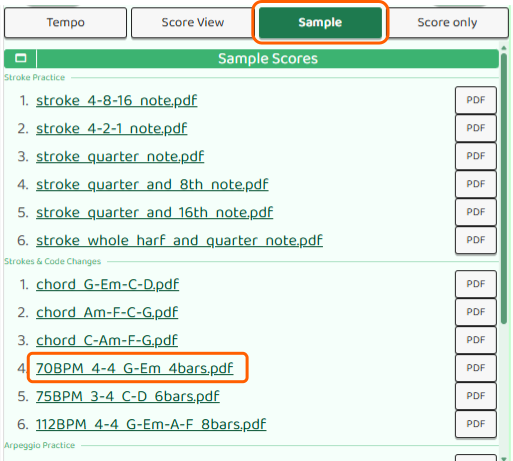
- トップ画面下の演奏ボタンを押す
- 切り替わった画面でSampleボタンを押すと、サンプル楽譜の一覧が表示される
- 使いたいサンプルの試すボタンを押す
- 楽譜のみボタンを押すと楽譜画面に切り替わる
楽譜を見ながらクリックに合わせて弾く
楽譜画面では、コード進行が小節ごとに表示されます。▷Start ボタンを押してクリックを再生すると、4拍ごとに小節が進み、現在の小節が強調表示されます。
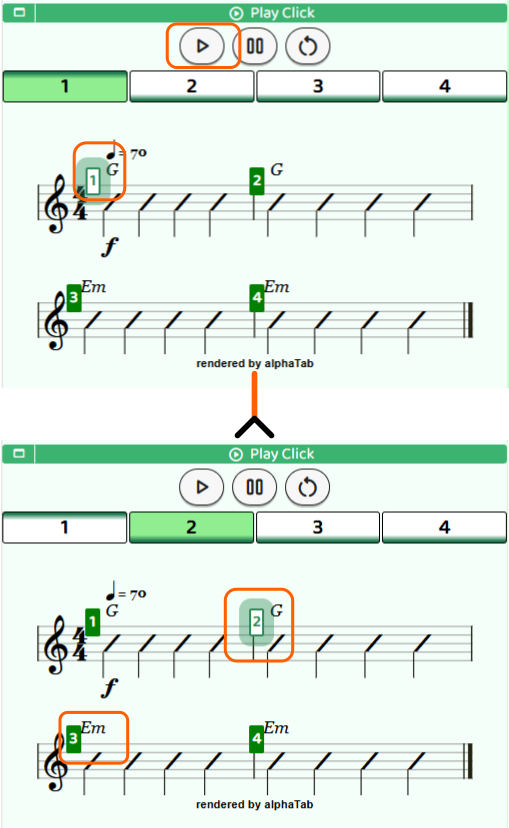
強調表示されている小節のコードをストロークしながら、クリックの音に合わせて弾いていきましょう。テンポと楽曲の進行を同時に意識することで、リズム感とコード感が一緒に鍛えられます。
最初はゆっくりなテンポに設定して、楽譜を追いながら弾くことに慣れていきましょう。
うまく弾けないときは
コードの押さえ方が分からなくなったら、楽譜画面の「コード」ボタンを押してみましょう。そのコード進行に使われているコードダイアグラムを一覧で確認できます。
テンポが速くて追いつけない場合は、「テンポ」ボタンを押して表示されるテンポダイアルを操作してテンポを下げてみましょう。楽譜を見ながら弾くことに慣れてきたら、少しずつテンポを上げていくのがコツです。
Why Playing with a Score Helps
So far you've practiced pressing a chord and playing in time with the click. The next step is playing along a chord progression — a sequence of chords that flows like a song. A chord progression simply means which chords you play and in what order. For example, G → C → G → D means you play each chord for one measure, cycling through the sequence.
Reading a score as you play lets you see not just the current chord, but the next chord coming up. Knowing what's ahead is key to making smooth chord changes.
Loading a Sample Score
B.Click comes with built-in sample scores so you can start practicing right away without creating your own.
- Tap the Play button at the bottom of the main screen
- Tap the Sample button on the next screen to see the list of sample scores
- Tap Try next to the score you want to use
- Tap Score only to open the score screen
Playing Along with the Click
In the score screen, the chord progression is shown measure by measure. Press the ▷Start button to begin the click — every 4 beats, the current measure advances and is highlighted on the score.
Strum the chord shown in the highlighted measure, keeping in time with the click. Tracking both the tempo and the chord progression at the same time trains your rhythm and chord feel together.
Start with a slow tempo until you feel comfortable reading the score while playing.
If You're Having Trouble
If you lose track of how to play a chord, tap the "Chord" button on the score screen. You'll see a list of chord diagrams for all the chords in the progression.
If the tempo is too fast to keep up, tap the "Tempo" button to bring up the tempo dial and slow it down. Once you feel comfortable reading the score while playing, gradually bring the tempo back up.
Por qué ayuda tocar con una partitura
Hasta ahora has practicado pulsar un acorde y tocar al ritmo del clic. El siguiente paso es tocar siguiendo una progresión de acordes — una secuencia de acordes que fluye como una canción. Una progresión de acordes indica, sencillamente, qué acordes tocar y en qué orden. Por ejemplo, G → C → G → D significa tocar cada acorde durante un compás, recorriendo la secuencia de principio a fin.
Leer la partitura mientras tocas te permite ver no solo el acorde actual, sino también el siguiente acorde que viene. Saber qué viene después es clave para hacer cambios de acorde fluidos.
Cargar una partitura de ejemplo
B.Click incluye partituras de ejemplo para que puedas empezar a practicar de inmediato, sin necesidad de crear la tuya propia.
- Pulsa el botón Reproducir en la parte inferior de la pantalla principal
- Pulsa el botón Sample en la siguiente pantalla para ver la lista de partituras de ejemplo
- Pulsa Probar junto a la partitura que quieras usar
- Pulsa Solo partitura para abrir la pantalla de partitura
Tocar al ritmo del clic
En la pantalla de partitura, la progresión de acordes se muestra compás por compás. Pulsa el botón ▷Start para iniciar el clic — cada 4 tiempos, el compás actual avanza y queda resaltado en la partitura.
Rasguea el acorde del compás resaltado siguiendo el ritmo del clic. Estar atento al tempo y a la progresión al mismo tiempo entrena tu sentido del ritmo y tu percepción de los acordes a la vez.
Empieza con un tempo lento hasta que te sientas cómodo leyendo la partitura mientras tocas.
Si tienes dificultades
Si no recuerdas cómo tocar un acorde, pulsa el botón "Acorde" en la pantalla de partitura. Verás una lista de diagramas de todos los acordes de la progresión.
Si el tempo es demasiado rápido para seguirlo, pulsa el botón "Tempo" para mostrar el dial de tempo y bájalo. Una vez que te sientas cómodo leyendo la partitura mientras tocas, ve subiendo el tempo poco a poco.