 .Click
コードを押さえてみよう How to Play Chords Cómo tocar acordes
コードとは
コードとは、複数の弦を同時に鳴らす音のことです。ギターでは「コードを押さえてストローク(弦を上下にかき鳴らす)」が演奏の基本パターン。最初は難しく感じるかもしれませんが、まず1つのコードをきれいに鳴らすところから始めましょう。
コードダイアグラムの見方
コードの押さえ方を図で示したものをコードダイアグラムといいます。B.Clickにはコードダイアグラムが内蔵されていて、いつでも確認しながら練習できます。
コード表示画面では、「maj」「min」などのコードの種類と、音名をボタンで選ぶと、コードダイアグラムが表示されます。音名はアルファベットで表記されており、日本語のドレミとは次のように対応しています。
C=ド D=レ E=ミ F=ファ G=ソ A=ラ B=シ
図の記号の意味を覚えておきましょう。
- 黒丸(●):そのフレットを指で押さえます
- ×印:その弦は弾かない。弦に軽く触れてミュートしてもOKですが、ストロークには含めません
- ○印:その弦は開放弦で鳴らします。フレットを押さえず、余分な指も触れていない状態にします
コードダイアグラムの下に表示されている数字は、ギターのフレット番号を示しています。
なお、B.Clickにすべてのコードが収録されているわけではありません。表示されないコードは、別途コード表などで調べてください。
コードを鳴らすときのネックの握り方
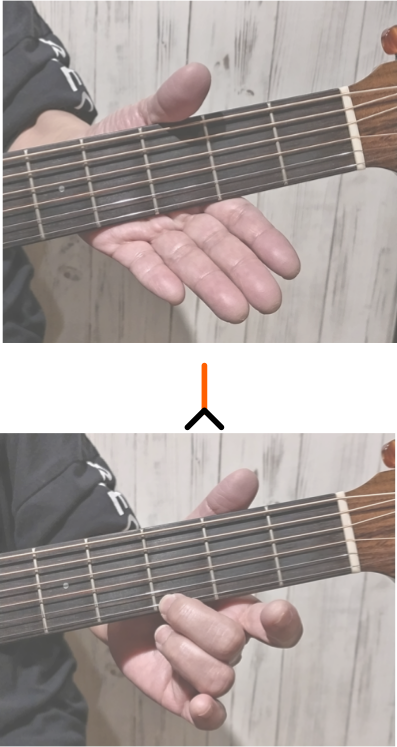
コードを押さえるときは、ネックを手でしっかり握り、指先でフレットのすぐ後ろを押さえるのが基本です。
「握る」とは言っても、指で弦を抑えるのが目的なので、あまり強く握りすぎないようにしてください。
例えば図では、中指で1弦の3フレットを抑えた図になっています。コードによって、1~6弦の抑えるフレットと弦は変化します。
Emコードを鳴らしてみよう
まず試してほしいのが Em(イーマイナー) です。押さえる場所は2か所だけなので、はじめてのコードにぴったりです。
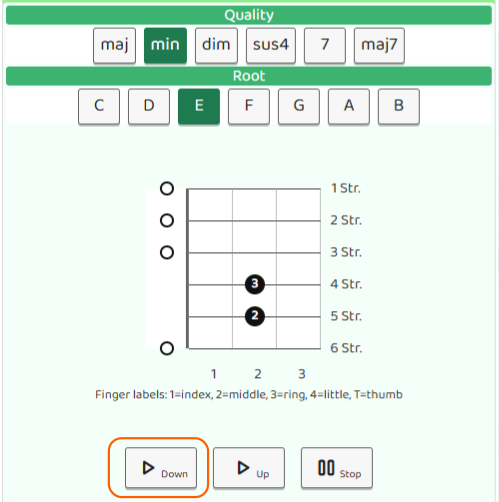
- 5弦の2フレットを中指で押さえる
- 4弦の2フレットを薬指で押さえる
ストロークはピックを使って弾くのが一般的です。ピックは親指と人差し指で軽くつまむように持ちます。
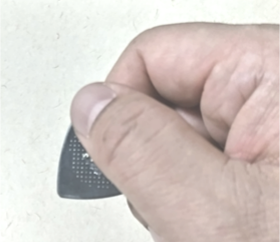
弦を上から下へ払うように動かすのがダウンストロークです。あとは全弦をやさしくダウンストロークで弾くだけ。ひとつひとつの弦がクリアに鳴っていれば成功です。
コードダイアグラム画面の 「▷Down」 ボタンを押すと、各弦の音を順番に鳴らして確認できます。自分のギターと聴き比べて、同じような音が鳴っていればOKです。
うまく鳴らないときは、次の点を確認してみましょう。
- 指がフレットのすぐ後ろにあるか。フレットから離れすぎていると音がビビりやすくなります。
- 押さえている指が隣の弦に触れていないか。隣の弦に指が当たっていると、その弦の音がミュートされてしまいます。
What Is a Chord?
A chord is when you press down multiple strings and strum them all at once to create a fuller, richer sound. Most guitar songs are built around strumming chords, so getting your first one right is a big step forward.
How to Read a Chord Diagram
A chord diagram shows you exactly where to place your fingers on the fretboard. B.Click has built-in chord diagrams you can check anytime while practicing.
In the chord screen, select a chord type (like "maj" or "min") and a note name (like "C", "D", or "E") to display the diagram for that chord.
Here's what the symbols mean:
- Filled dot (●): Press this string at this fret
- × (X): Don't strum this string — you can lightly rest a finger on it to mute it, but don't include it in your strum
- ○ (O): Play this string open — don't fret it, and make sure no finger is accidentally touching it
The numbers shown at the bottom of the chord diagram indicate the guitar's fret numbers.
Note that B.Click doesn't include every possible chord. If a chord isn't available, look it up in a chord chart elsewhere.
How to Hold the Neck
Grip the neck with your hand and press the strings with your fingertips just behind the fret. That said, don't squeeze too hard — the goal is to press the strings cleanly, not to grip tightly.
In the example below, the middle finger is pressing the 1st string at the 3rd fret. The exact strings and frets will change depending on the chord.
Try the Em Chord
The Em chord (E minor) is one of the best chords to start with — you only need to press down two strings.
- Place your middle finger on the 5th string at the 2nd fret
- Place your ring finger on the 4th string at the 2nd fret
Strumming is typically done with a pick. Hold the pick lightly between your thumb and index finger.
A downstroke means sweeping the pick downward across the strings. Strum all six strings with a smooth downstroke. If every string rings out clearly, you've nailed it!
Tap the "▷Down" button in the chord diagram screen to hear each string played one by one. Compare the sound to your guitar — if they match, you're good!
If something sounds off, check the following:
- Are your fingers pressing just behind the fret? Too far back often causes an unwanted buzz.
- Are your fingers accidentally touching an adjacent string? Even light contact with a neighbouring string will mute it.
¿Qué es un acorde?
Un acorde es cuando presionas varias cuerdas al mismo tiempo y las tocas de un solo golpe para crear un sonido más completo. La mayoría de las canciones de guitarra se basan en rasguear acordes, así que aprender tu primero es un gran paso en tu aprendizaje.
Cómo leer un diagrama de acordes
El diagrama de acordes muestra exactamente dónde colocar los dedos en el mástil. B.Click tiene diagramas de acordes incorporados que puedes consultar en cualquier momento mientras practicas.
En la pantalla de acordes, selecciona el tipo de acorde (como "maj" o "min") y el nombre de la nota para ver el diagrama correspondiente. Las notas se escriben con letras en inglés, que se corresponden con el solfeo de la siguiente manera:
C=Do D=Re E=Mi F=Fa G=Sol A=La B=Si
Esto es lo que significan los símbolos:
- Punto relleno (●): Pisa esa cuerda en ese traste
- × (X): No rasguees esa cuerda — puedes apoyar un dedo ligeramente para silenciarla, pero no la incluyas en el rasgueo
- ○ (O): Toca esa cuerda al aire — no la pises, y asegúrate de que ningún dedo la esté tocando accidentalmente
Los números que aparecen en la parte inferior del diagrama de acordes indican el número de traste de la guitarra.
Ten en cuenta que B.Click no incluye todos los acordes posibles. Si un acorde no aparece, búscalo en una tabla de acordes aparte.
Cómo sujetar el mástil
Sujeta el mástil con la mano y presiona las cuerdas con las yemas de los dedos justo detrás del traste. Dicho esto, no aprietes demasiado fuerte — el objetivo es pisar las cuerdas con limpieza, no agarrar con fuerza.
En el ejemplo de la figura, el dedo corazón pisa la primera cuerda en el tercer traste. Las cuerdas y trastes exactos cambiarán según el acorde.
Prueba el acorde Em
El acorde Em (Mi menor) es uno de los más fáciles para empezar: solo necesitas pisar dos cuerdas.
- Coloca el dedo corazón en la quinta cuerda, segundo traste
- Coloca el dedo anular en la cuarta cuerda, segundo traste
El rasgueo se hace normalmente con una púa. Sujeta la púa suavemente entre el pulgar y el índice.
El golpe hacia abajo consiste en mover la púa de arriba hacia abajo sobre las cuerdas. Rasguea las seis cuerdas con un golpe suave hacia abajo. Si cada cuerda suena limpia y clara, ¡lo lograste!
Pulsa el botón "▷Down" en la pantalla del diagrama de acordes para escuchar cada cuerda una por una. Compara el sonido con tu guitarra — si suenan igual, ¡vas bien!
Si algo suena mal, verifica lo siguiente:
- ¿Los dedos están justo detrás del traste? Presionar demasiado atrás suele causar un zumbido no deseado.
- ¿Algún dedo está tocando una cuerda adyacente sin querer? Incluso un contacto ligero con una cuerda vecina la silenciará.